On This Page
Lifecycle Callbacks
Server Side Rendering
Callback Arguments
DOM Lifecycle Events
Callback Sequence
Each web component has lifecycle callbacks that help you define behavior at each point in the loading, rendering, and removal process.
Semantic UI components wrap native web components but provide additional callbacks that give you more granular control over how the component is defined.
- createComponent - Defines your component instance that includes the invokable functionality of your component and exposed variables.
- onCreated - Callback after your component instance is initialized but before it is attached to the DOM
- onRendered - Callback after your component is rendered to the DOM
- onDestroyed - Callback after your component is removed from the DOM
- onThemeChanged - Callback when your components theme is updated
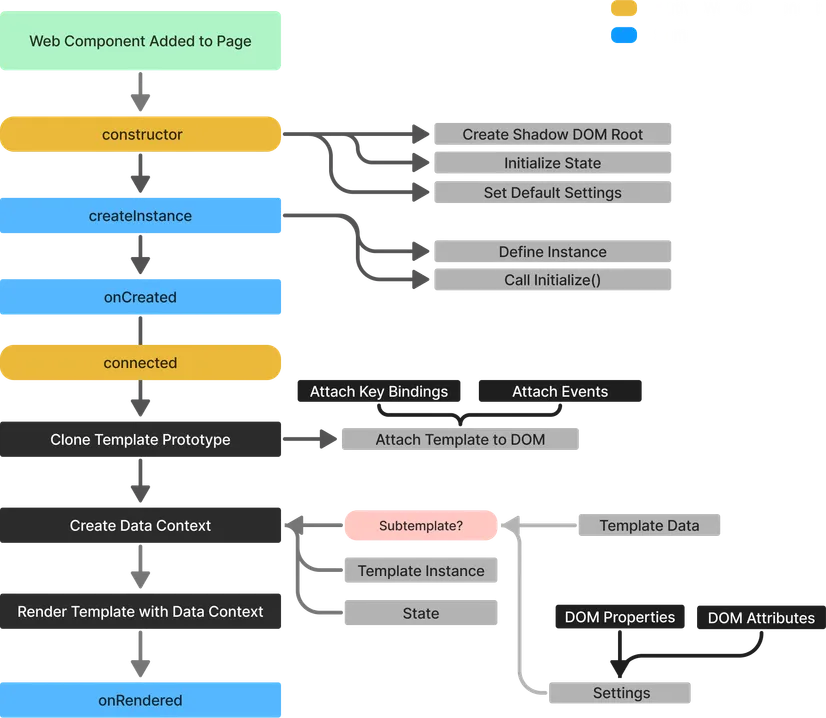
For a more detailed description of how callbacks are fired refer to the callback event sequence diagram.
Render Function Unlike many front end frameworks which require your render function to return the html for your component, your component’s html is defined in the template passed to
defineComponent.
Lifecycle Callbacks
createComponent
createComponent is used to define the component instance at runtime. Each web component will have its own instance which will include its own state and settings.
For more information see the dedicated section for component instances.
Initialize
If you include a method called initialize in your returned instance it will be called immediately allowing you to set up initial state for the component, for instance adding any reactive calculations or dynamically defined variables.
onCreated
onCreated fires after the instance is defined but before the DOM is rendered. You can use this callback to handle special behaviors that require the component instance but not its rendered DOM, for instance attaching external event handlers to the page.
onRendered
The onRendered callback occurs after the initial render of the web components Shadow DOM.
This can be used to run code which requires access to the DOM. Although this callback will fire on the server you will not be able to access deeply nested DOM as server rendered components are rendered in isolation.
onDestroyed
The onDestroyed callback is called after the component is removed from the page.
onThemeChanged
The onThemeChanged callback is a special callback that fires when a user swaps themes. This can be used to modify the component based on whether the user prefers light or dark mode.
Server Side Rendering
Hydration
Semantic UI components support server-side rendering out of the box. The default native rendering engine ships with a built-in SSR pipeline that emits Declarative Shadow DOM and hydrates without re-rendering on the client. Components using the optional lit engine can integrate with Lit’s SSR packages instead.
UI Components All UI framework components in Semantic UI are designed to work with server side hydration out of the box.
Lifecycle Events on Server
Lifecycle callbacks (onCreated, onRendered, onDestroyed) fire on the server in the same order as on the client. DOM lifecycle events are suppressed during hydration so external listeners aren’t fired twice for the same render. Use isServer or isClient inside callbacks when reaching for globals that may not be defined on the server.
const onRendered = function ({ isClient, self }) { if(isClient) { self.url.set(window.location.pathname); }};Callback Arguments
Using Callback Arguments
Each callback receives a destructurable set of arguments that can be used to interact with the internals of the component. This allows you to pull into any function scope necessary values without managing imports or the this context.
These are accessible from all lifecycle callbacks, as well as inside event listeners and keybindings.
const onCreated = ({isServer, darkMode, self}) => { if(!isServer && darkMode) { self.setDarkMode(); }};You can use these to do things like query the DOM, setting up custom reactivity and much more.
Standard Arguments
The following parameters are destructurable from all callbacks.
For information on
selfaliases see self aliases.
| parameter | use |
|---|---|
| el | the DOM element of the web component |
| self | the template instance from createComponent |
| tpl | alias for self |
| component | alias for self |
| $ | allows you to query the shadow dom of the component |
| $$ | allows querying deep nested content including slots |
| reaction | a reactive context for computations |
| signal | a function to define a reactive variable |
| computed | a signal computed from one or more signals |
| derive | a signal derived from a single source signal |
| match | a per-key reactive selector against a signal |
| flush | a function to immediately trigger queued reactions |
| afterFlush | a callback after reactive computations are flushed |
| nonreactive | a callback with no reactivity |
| guard | a reactive read that blocks propagation when unchanged |
| settings | a read-write copy of the component’s settings |
| state | a reactive data store for internal state |
| data | the full data context used when evaluated expressions |
| rerender | trigger a full DOM rerender for component |
| isRendered | a function returning whether the DOM has rendered |
| isServer | whether component is rendering on server |
| isClient | whether component is rendering on client |
| dispatchEvent | helper to emit events from the component |
| attachEvent | helper to listen to external events |
| bindKey | helper to bind keyboard shortcuts dynamically |
| interval | setInterval that auto-clears on component destroy |
| timeout | setTimeout that auto-clears on component destroy |
| abortSignal | AbortSignal tied to component lifecycle |
| helpers | allows access to template helpers |
| template | the underlying semantic template |
| templateName | the name of the current semantic template |
| templates | all rendered templates on current page |
| findTemplate | helper to find a specific template |
| findParent | helper to find a specific parent template |
| findChild | helper to find a child template |
| findChildren | helper to find multiple child templates |
| darkMode | boolean for if dark mode is active |
Event Callbacks
Event handlers also have access to a few additional arguments
| parameter | use |
|---|---|
| target | the dom element that dispatched the event |
| event | the native event object |
| value | value of the dispatching element (form fields, custom event detail) |
| data | event.detail + data attributes on the dispatching element |
| isDeep | the event came from inside another web component’s shadow tree |
Key Bindings
Key bindings also have access to a few additional arguments
| parameter | use |
|---|---|
| event | the native KeyboardEvent |
| inputFocused | whether any input/contenteditable is focused |
| repeatedKey | whether the key is held down |
Lifecycle events provide two helpers isClient and isServer which can be used to handle server vs client rendering.
DOM Lifecycle Events
Each component will also emit a DOM event when a lifecycle event fires. This can be useful to respond to the render cycle of subcomponents from elsewhere in the page
| event | when fired |
|---|---|
| created | Callback after your component instance is initialized but before it is attached to the DOM |
| rendered | Callback first time your component is rendered |
| destroyed | Callback after your component is removed from the DOM |
These can be listened to from other components in the same way as other DOM or custom events.
For more information on custom events see the dedicated subsection
Callback Sequence
The following diagram shows the sequence of events that occur when a component is rendered to the page.